
B1 Free Archiver
B1 Free Archiver: Free and Open-Source Archive Software for Windows
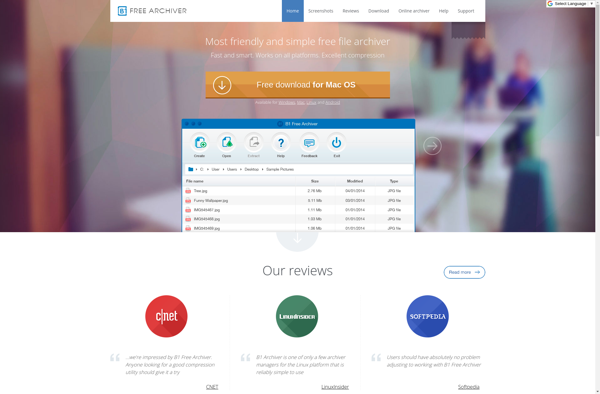
B1 Free Archiver is a free and open-source file archiver software for Windows. It can create and extract archives in multiple formats including 7z, ZIP, GZIP, BZIP2, TAR, ISO, and WIM. Key features include file compression and encryption, self-extracting archives, multiple language support, and integration with Windows File Explorer.
What is B1 Free Archiver?
B1 Free Archiver is a versatile, multi-format archiving tool for Windows that allows compressing and decompressing files and folders in various archive formats. It is free, open-source software distributed under the GNU GPL license.
With B1 Archiver, users can create archive files such as 7z, ZIP, GZIP, BZIP2, TAR, ISO, and WIM. It utilizes strong compression algorithms to reduce file sizes for efficient storage and transfer. Encryption can also be applied to archive contents for enhanced security.
The intuitive interface integrates directly with Windows File Explorer for drag-and-drop archiving. There are also various options for tweaking compression levels, encryption methods, archive formats, and other parameters. Self-extracting EXE archives can be generated for easy, no-installation distribution.
B1 Archiver runs smoothly on all modern Windows versions. It is localized in multiple languages and has a small footprint. An optional command line version is available for advanced users and automation. Overall, it's a handy tool for file management tasks like backups and storage optimization.
B1 Free Archiver Features
Features
- File compression
- File encryption
- Self-extracting archives
- Support for multiple archive formats (7z, ZIP, GZIP, BZIP2, TAR, ISO, WIM)
- Multiple language support
- Integration with Windows File Explorer
Pricing
- Free
Pros
Cons
Official Links
Reviews & Ratings
Login to Review21 reviews
Rating Breakdown
Recent Reviews
Morgan Walker
May 01, 2026A Truly Free and Capable Archiver
I needed a reliable tool to compress some old project folders and B1 Free Archiver worked perfectly. It integrated seamlessly with my right-click menu in Windows Explorer, making the process incredibly fast. The ability to handle formats like 7z and …
Taylor Harris
Apr 30, 2026Clunky and unreliable - wouldn't recommend
I tried using B1 Free Archiver to extract a large ZIP file and the process froze halfway through, forcing me to kill the program through Task Manager. The Windows Explorer integration feels sluggish and the interface is unintuitive compared to …
Emma Harris
Apr 28, 2026A Reliable and Powerful Free Alternative
I've been using B1 Free Archiver for years to handle all my compression needs, from zipping project folders to extracting tricky ISO files. It integrates perfectly into my Windows right-click menu, making it incredibly fast to use, and I've never …
Lisa Jackson
Apr 26, 2026A Reliable and Powerful Free Archiving Tool
B1 Free Archiver has become my go-to for all my compression needs. It handles my mix of ZIP and 7z archives flawlessly, and I really appreciate the clean interface and the right-click integration in Windows Explorer. It's refreshing to find …
Olivia Chen
Apr 26, 2026A Reliable Free Archiver That Handles Everything
I've been using B1 Free Archiver for a few months now to handle my mix of 7z, ZIP, and ISO files, and it's become my go-to tool. It's incredibly straightforward, integrates seamlessly with Windows Explorer, and the fact that it's …
Rating Distribution
The Best B1 Free Archiver Alternatives
View all B1 Free Archiver alternatives with detailed comparison →
Top File Management and Compression and other similar apps like B1 Free Archiver
Here are some alternatives to B1 Free Archiver:
Suggest an alternative ❐
7-Zip


WinZip


PeaZip


Zarchiver


The Unarchiver


Keka


File Roller


FreeArc


P7zip


Express Zip

NanaZip


AutoUnpack


ZipItFree


JZip


ICEOWS

Bandizip


WinRAR


Dr. Unarchiver


7Zipper